
Getting inventory right depends on choosing a barcode scanner that matches your workflow, not just the price tag. The wrong scanner will slow your team, miss damaged barcodes, or fail to connect reliably when you need it most.
This guide is written for warehouse managers, store owners, and mobile inventory teams who need fast, accurate scanning and proven reliability. Each pick is chosen for real-world performance and practical trade-offs.
You’ll find clear verdicts for wireless, corded, and hybrid models, plus a buying guide outlining what actually matters. Skip straight to the comparison table to see feature differences at a glance.
Read on for the best barcode scanner for inventory in every scenario, plus answers to the most-searched setup and usage questions.
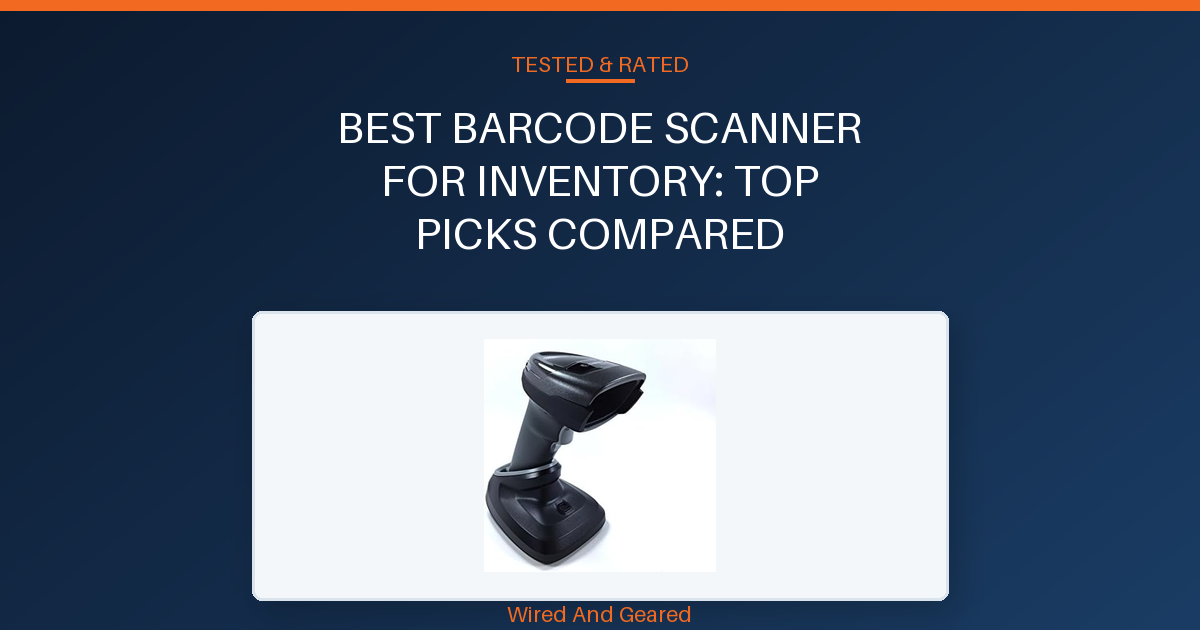
Our overall best pick: Zebra Symbol DS2278-SR Wireless 2D/1D Bluetooth Barcode →
- Zebra Symbol DS2278-SR Wireless 2D/1D Bluetooth BarcodeSee on Amazon →
- Tera Barcode Scanner Wireless with Screen: Pro Version 1D 2DSee on Amazon →
- Tera Barcode Scanner Wireless 1D Laser Cordless BarcodeSee on Amazon →
| Product | Scan Types | Wireless Range | Battery Capacity | Connection Types | |
|---|---|---|---|---|---|
| Zebra Symbol DS2278-SR Wireless 2D/1D Bluetooth Barcode | 1D, 2D | Bluetooth, up to 14.5 in scan range | Rechargeable, cradle included | Bluetooth, USB | See on Amazon |
| Tera Barcode Scanner Wireless with Screen: Pro Version 1D 2D | 1D, 2D, QR, PDF417 | 328 ft (open), 114 ft (obstacles) | 2500mAh, all-day use | Bluetooth, 2.4G wireless, USB | See on Amazon |
| Tera Barcode Scanner Wireless 1D Laser Cordless Barcode | 1D only | 328 ft (open) | Long, indicator light | 2.4G wireless, USB | See on Amazon |
| Symbol Zebra LS2208 Series Corded Handheld Standard Range | 1D only | Corded only | USB powered | USB | See on Amazon |
| NETUM Bluetooth Barcode Scanner, Support | 1D only | Bluetooth, 2.4G wireless | 2600mAh, up to one month | Bluetooth, 2.4G wireless, USB | See on Amazon |
Zebra Symbol DS2278-SR Wireless 2D/1D Bluetooth Barcode
The DS2278-SR is built for commercial environments, with a scan range from 0.5 to 14.5 inches and omni-directional scanning that eliminates the need to line up barcodes. Setup is nearly instant, with default settings optimized for inventory and checkout, and plug-and-play operation on Windows, Android, and iOS.
The Wi-Fi-friendly Bluetooth mode avoids interference with your wireless LAN, which is critical in dense retail or warehouse setups. Durability is proven, with units surviving daily use in a lumber yard and store for over 18 months without failures.
Scanning is fast and reliable from multiple angles, and the device is quiet, with a non-annoying beep. Multi-device control from PC or smartphone lets operators manage scanner behavior and settings easily.
The kit includes a charging cradle, USB cable, and battery. A small percentage of units fail after the return window, so buyers expecting multi-year longevity should monitor early performance.
This scanner is best for high-traffic inventory and checkout stations needing flawless omni-directional scanning. Skip this if you require absolute assurance against post-return failures.
Strengths
- Omni-directional scanning, no need to line up barcodes
- Wide scan range (0.5 to 14.5 inches)
- Plug-and-play, no configuration required
- Wi-Fi-friendly Bluetooth avoids interference
- Survives heavy daily use for over a year
- Multi-device control for settings and feedback
Trade-offs
- Some units fail shortly after return window
- Higher price than basic models
- No explicit drop rating or stand-alone IP rating
Tera Barcode Scanner Wireless with Screen: Pro Version 1D 2D
The HW0009 stands out for its customizable onboard screen, letting you check scans and settings without needing to glance at a computer. This is especially useful for cataloging tasks or inventory work where immediate feedback reduces mistakes.
The keypad and cradle streamline setup and charging, and the scanner reliably connects via Bluetooth, 2.4G wireless, or USB, with up to 328 feet of range in open spaces and strong compatibility across devices and operating systems. Scanning performance is excellent, handling everything from high-density barcodes to reflective surfaces and PDF417 codes on driver’s licenses.
The battery lasts all day and the device is sturdy, surviving multiple drops without issue. Setup is straightforward, though pairing via Bluetooth may require a specific trigger sequence, and some users report difficulty setting the time due to non-English error messages in the syncing software.
A minority of units fail within a month, with at least one reviewer reporting a sudden breakdown after about thirty days. The device is heavier than some alternatives and the screen can be tricky to scroll for long QR codes.
Skip this if you need absolute long-term reliability or a lighter device for handheld use over extended shifts.
Strengths
- Customizable screen provides real-time scan verification
- Fast and accurate reading of both 1D and 2D barcodes, including PDF417
- Works wirelessly up to 328 feet and supports Bluetooth, wireless, and USB
- Charging cradle and 2500mAh battery deliver all-day operation
- Survives drops and has a sturdy build
- Handles barcode types others miss, including UPC +5 supplements
Trade-offs
- Some units fail early, with at least one breaking after a month
- Heavier than typical handheld models
- Setting the time is difficult due to confusing, non-English software
Tera Barcode Scanner Wireless 1D Laser Cordless Barcode
Setup is quick, requiring only plugging in the USB receiver or cable, and the scanner works instantly across Windows systems with no drivers needed. The battery indicator light gives a clear readout, eliminating low battery surprises, and the device scans quickly and reliably, even with damaged or poorly printed barcodes.
The wireless range is substantial, reaching up to 328 feet in open areas, making it ideal for stock rooms and warehouse aisles. The scanner’s grip is comfortable, with an extended handle and a smooth trigger suited for all-day use.
The orange anti-shock silicone cover protects against drops from up to 6.5 feet and IP54 dust resistance is suitable for most warehouse environments. Programmability is limited, and while it outperforms other scanners in scan accuracy, rare reversals of characters can occur, though less frequently than competitors.
The scanner does not support 2D or QR codes and cannot hide leading characters in barcodes, which is a limitation for workflows that require custom formatting or scanning Apple serials. Skip this if you need 2D/QR functionality or programmable scan output.
Strengths
- Instant plug-and-play setup with USB receiver
- Fast and reliable scanning of 1D barcodes, including damaged or reflective codes
- Battery indicator prevents unexpected downtime
- Wireless range up to 328 feet
- Comfortable grip and trigger for extended use
- Durable, survives drops up to 6.5 feet, IP54 dust resistance
Trade-offs
- Does not scan 2D or QR codes
- Rare character reversals require occasional rescan
- Limited programmability for custom output
Symbol Zebra LS2208 Series Corded Handheld Standard Range
The LS2208 delivers fast, accurate 1D scans with a lightweight build and a simple USB connection. No software installation is required, and the device works immediately with both Windows and Mac (using USB-C adapters if needed).
The kit includes a gooseneck stand for hands-free operation, making it convenient for checkout or inventory work. Durability is proven, with reviewers using it for inventory management and barcode tracking projects.
Scanning is fast, and the device handles a variety of 1D barcodes reliably. This unit is especially popular among Square POS users, offering a cost-effective alternative to pricey proprietary scanners.
A very small percentage of units fail to turn on, so double-check early operation. The LS2208 does not scan 2D or QR codes and requires a corded connection, making it unsuitable for mobile inventory tasks or environments needing wireless flexibility.
Skip this if you need wireless scanning or 2D/QR capability.
Strengths
- Plug-and-play USB setup with no software required
- Lightweight and easy to handle
- Durable and fast scanning
- Comes with stand for hands-free operation
- Works with Mac and Square POS
- Affordable compared to proprietary models
Trade-offs
- Corded only, no wireless option
- Does not scan 2D or QR codes
- Rare units fail to power on
NETUM Bluetooth Barcode Scanner, Support
The NETUM NT-1228bc offers strong compatibility across iOS, Android, Windows, and Linux, connecting via Bluetooth, 2.4G wireless, or USB. Three scan modes, manual, continuous, and auto-sensing, adapt to different workflows, and storage mode lets you capture up to 100,000 barcodes when out of wireless range.
The 2600mAh battery lasts for weeks, and the scanner reliably decodes worn, tightly spaced, or screen-displayed 1D barcodes. Durability is proven in demanding environments, with one reviewer using it nightly in Walmart stocking and dropping it on concrete multiple times without damage.
Bluetooth pairing can be finicky, but the included USB dongle provides instant, stable connectivity. Scan speed and reliability are high, and the device fits comfortably in hand for extended shifts.
The scanner does not support QR or 2D codes and may unpair occasionally when idle. It is incompatible with Square POS, Divalto, DoorDash, and Lightspeed systems.
This is best for inventory teams needing mobility and offline scan capture. Skip this if you require QR/2D capability or POS system compatibility.
Strengths
- Supports Bluetooth, wireless, and USB across all major platforms
- Three scan modes plus storage for 100,000 barcodes
- Fast, reliable decoding of damaged, screen, or tightly spaced 1D codes
- Durable, survives repeated drops on concrete
- Battery lasts for at least a month with daily use
- Programmable configuration for custom scan output
Trade-offs
- Does not scan QR or 2D codes
- Bluetooth pairing can be unreliable when idle
- Not compatible with Square POS, Divalto, DoorDash, Lightspeed
01Scanning type (1D vs. 2D)
Barcode scanners come in 1D and 2D models. 2D scanners read QR codes, damaged labels, and phone screens, making them essential for modern inventory tracking. Avoid buying a 1D-only scanner if your workflow includes QR codes or mobile check-ins, since those will not scan reliably.
02Wireless vs. Corded
Wireless scanners offer mobility for large warehouses and retail floors, but require battery management and Bluetooth pairing. Corded models are ideal for fixed stations, providing constant power and simple setup. Choose wireless for coverage across wide areas, but don’t overlook corded simplicity for small shops.
03Durability and drop rating
Inventory environments are tough on equipment. Look for scanners with drop ratings of at least 5 feet onto concrete and IP54 or higher for dust and moisture resistance. Avoid fragile models that lack a clear durability spec, since even a single drop can knock out a scanner in a busy warehouse.
04Integration and compatibility
Your scanner must connect easily to your inventory system. Plug-and-play USB or Bluetooth is standard, but check for compatibility with your software and devices. Skipping this step can lead to wasted hours troubleshooting drivers and connectivity issues.
05Battery life and storage
Wireless scanners need batteries that last a full shift and enough offline storage for batch scanning when out of range. If your team scans in remote or mobile settings, prioritize battery runtime and offline mode. Overlooking this can result in lost scans or downtime during inventory counts.